
Improving Quality Assurance and Development Efficiency with Regression Testing
- Authors

- Topics
Introduction
Developing applications in the field of humanities sometimes means rendering a lot of textual data in accordance with scholarly rules. Digital editions can be particularly challenging. The desired display must comply with a set of sophisticated rules including layout constraints and citation patterns.
This resource demonstrates how software testing can enhance both development and editorial processes, as shown by the testing workflows introduced in an example edition.
This resource is intended for readers with basic knowledge of digital editions and working familiarity with TEI and XML, especially developers and project managers.
If you are new to digital editions, please have a look at the course Digital Scholarly Editions: Manuscripts, Texts and TEI Encoding.
After providing background, the resource explains why testing is useful, introduces screenshot comparison and text comparison tests, describes how results can be shared with data curators, and concludes with practical takeaways.
Learning Outcomes
After completing this learning resource, learners should be able to:
- Name types of regression tests that are beneficial and appropriate when developing digital editions.
- List features of a tool like Playwright that are particularly useful for testing text-heavy applications.
- Approach testing in their own development stack.
Glossary
- Regression testing: testing whether changes in code introduced unwanted side effects or have broken previously working functionality
- XML (eXtensible Markup Language): a markup language for structuring and encoding texts in a machine-readable, tag-based format
- XSLT (eXtensible Stylesheet Language Transformations): language for transforming XML files into other formats like HTML
- TEI (Text Encoding Initiative): guidelines for encoding literary and linguistic texts in XML
- eXist-db: an open source XML database
- End-to-end (E2E) testing: validating real user workflows across an application
- Playwright: an end-to-end test framework. (Playwright documentation)
- Screenshot tests: automated comparison of rendered output to baseline images through pixel-by-pixel diffing
- String comparison tests: automated comparison of rendered strings to baseline data
Background
In 2021, the Austrian Centre for Digital Humanities published the digital edition of Third Walpurgis Night by Austrian author and publicist Karl Kraus.
In the beginning of the project, the TEI Publisher – a framework for digital editions based on eXist-db – was chosen to create and publish the edition. In 2024 the migration to a different framework for digital editions – DSE-Static-Cookiecutter – was decided and tackled.
The migration process included simplifying certain parts of the codebase which had grown due to ongoing changes in the source data and additional feature requests.
This resource arose from the challenges of this migration process. As with any migration, developers must ensure that the application looks and behaves as it did before. Changes may introduce regressions; the detection of such changes can be automated by introducing E2E regression tests.
The edition data consists of XML files following the TEI standard, which are transformed into HTML via XSLT. XML structures can be rather simple and flat, but in the case of digital editions philological requirements can increase the need for more structural complexity (i.e. multiple levels of nesting, varying ancestor-descendant relationships). Exceptions of rules must be handled as well.
In addition to the migration, the edition is still undergoing editorial revision, which represents a second potential source of regressions, meaning: both the developer who changes code or the editor, who changes data, can cause intentional as well as unwanted changes.
Why Test?
Compared to manual reviewing, automated testing is more time-efficient and enables faster detection of regressions.
The following section presents two types of tests: screenshot comparison and text matching. These approaches are well suited to automating tasks typically performed by a human reviewer.
The tool of choice in this example is the Playwright framework, which allows running multiple browser interactions and comparing the result to the test data. By using parameterised tests, the development process can be sped up and high test coverage can be achieved. The usefulness of setting up these tests becomes evident when looking at the quantity and quality of the data in the presented use case.
Screenshot Comparison Tests
Screenshot tests can be considered an automated way of visual inspection by a person. A screenshot of a current version of a website is compared to an earlier version.
In Playwright Visual comparisons provide the ability to take browser screenshots and compare them. Usually the developer would work on a view of his app and run an initial screenshot comparison test — which fails as expected, because there are no screenshots yet — to produce reference screenshots which are then used when rerunning the test.
Running tests generates a test report. This report can come in different formats based on the chosen reporter in the configuration. By using the HTML Reporter the results can be easily browsed, which will be shown in the following section.
Testing the Edition’s Main View Containing the Running Text
This resource will not go into the specifics of the complex TEI-XML structure of this edition, but here is a list of some criteria the rendering has to meet:
- certain elements should not be rendered at all
- certain elements should be rendered at a different position
- for certain elements different fonts, text formatting and spacing properties must be applied
Additionally, the migration process includes simplifying certain parts of the codebase which has grown due to ongoing changes in the source data and additional feature requests. Here, simplifying means using more concise XSLT and CSS rules to reduce complexity and improve maintainability.
Page 18 of the edition gives a good example of the complexity that has to be dealt with.
Since changing the XSLT or CSS rules may affect multiple pages of the edition, efficient testing is therefore necessary. To test all pages the same test logic is reused by parameterising the URL path as well as the screenshot path, thereby generating 65 tests.
In this migration scenario the initial set of screenshots is taken from the legacy app, by using its URL in the first test run.
The screenshots in this setup must meet two important criteria:
- Only capture the running text of the edition. The test should not care about or fail because of differences in components like menus or side panels. This would be different test cases.
- Capture the full vertical scrollable content, not only the part currently visible in the viewport.
Have a look at the screenshot for page 18 in the project repository.

As mentioned Playwright provides an interactive interface for browsing test results via the HTML Reporter. After running the tests two result views are available. The first view displays all completed tests (failed and passed) in list form (65 tests for 65 pages). From the list view, the detail view of a test can be accessed. If a test failed, this detail view contains handy sub-views, including a side-by-side comparison as well as a “slider”:
Introducing and automating screenshot comparison avoids the necessity of a human curator rechecking the same view after every data or code change, speeding up editorial and development workflow. Tools like Playwright detect pixel-level differences instantly, catching visual regressions faster and more reliably than the human eye, which can easily overlook subtle changes.
Developers should scope each screenshot to only the page region under test. Irrelevant sections (e.g., header, menu, footer) must be excluded; otherwise, a small change outside the target area can cause the test to fail even though the actual subject remains unchanged.
Text Comparison Tests
Text comparison tests (text matching) can be regarded as an automated form of proofreading. A rendered string is compared to a baseline string. Next to the main edition text, the interface shows annotation metadata (person, intertexts, comments) inside a sidebar-like element. For this metadata, the content’s correctness is more important than its visual styling – for example, displaying the correct birth date of a person matters more than whether the text appears in italics.
Because the edition contains a large amount of metadata, storing baseline strings is much lighter and faster than saving screenshots of small parts of the screen.
Testing the Edition’s Detail Views Containing Metadata
References to metadata as of November 2024 (beginning of migration):
- persons, person groups: 899
- intertexts: 1950
- comments: 766
The metadata is displayed next to the main text in the edition view in two different modes or views: a short info view and a detail view.
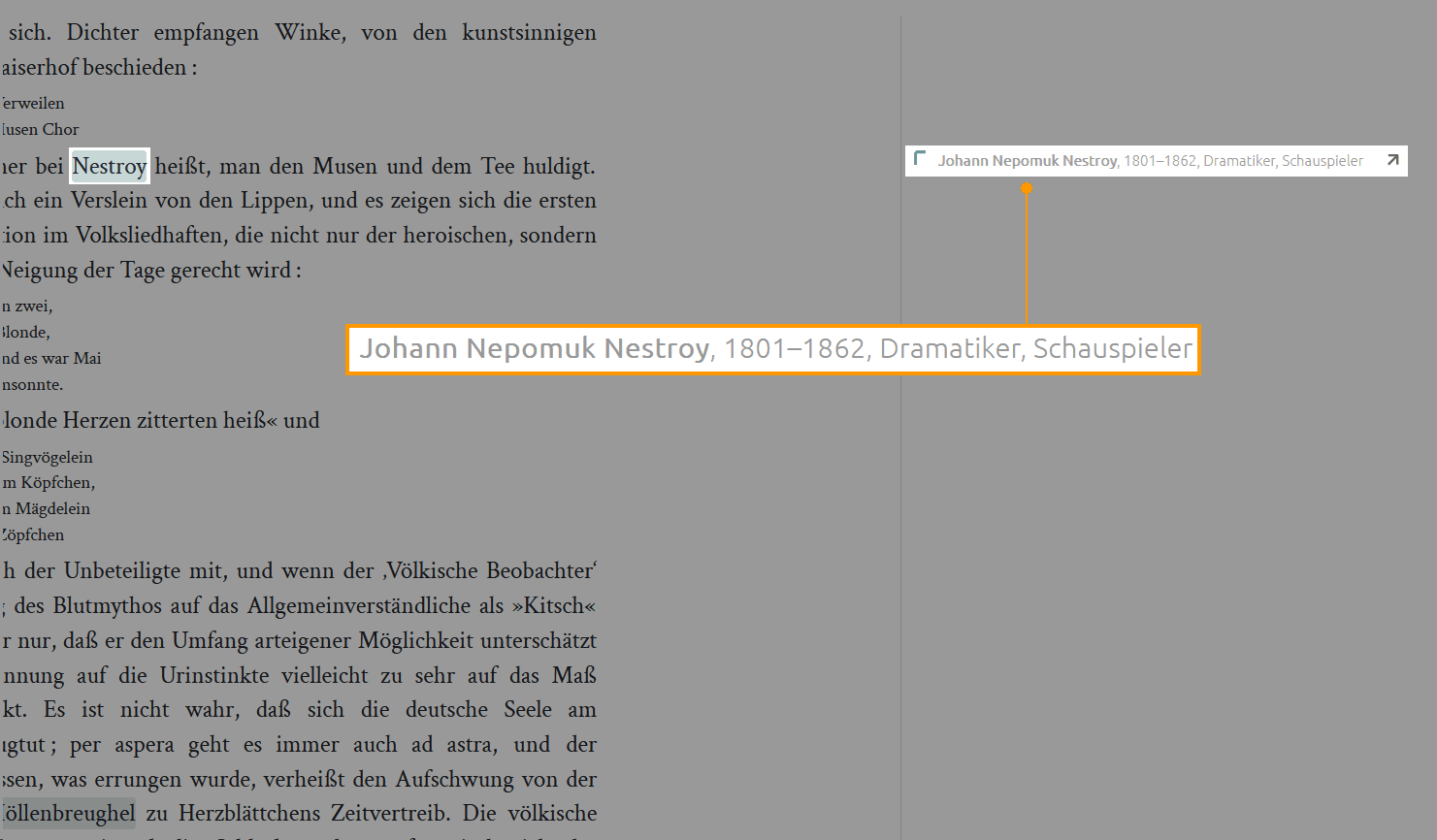
Figure 1. Karl Kraus 1933: Dritte Walpurgisnacht — Edition view with short info
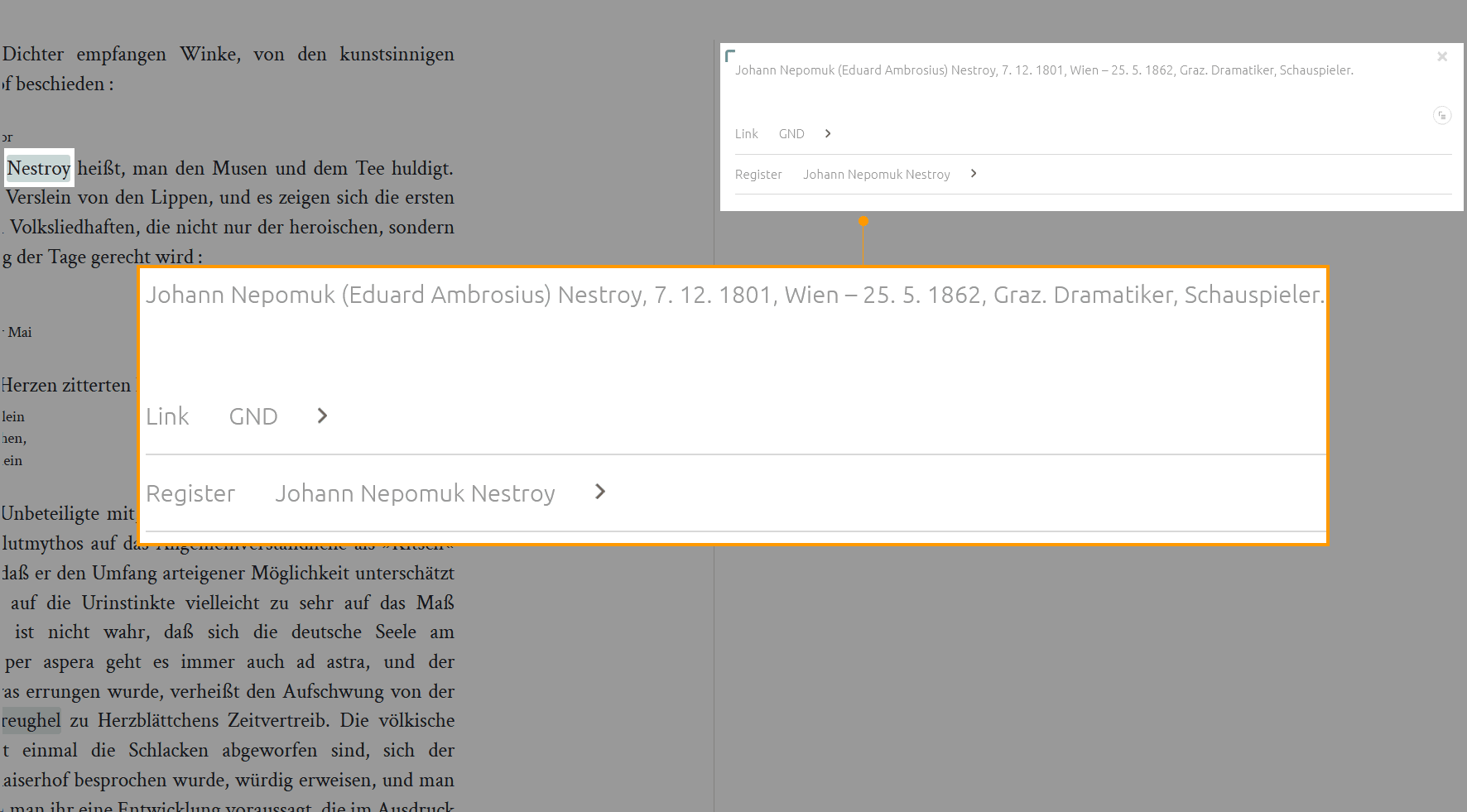
Figure 2. Karl Kraus 1933: Dritte Walpurgisnacht — Edition view with expanded detail info
For each of these annotations at least one short info view and one detail info view is needed. In some cases an annotation contains multiple references.
During the first phase of the project, a significant amount of time was invested in defining and refining the rule set for rendering prosopographic and bibliographic data, as well as proofreading the final outcome.
To ensure consistency throughout the migration process text comparison tests were set up. The pre-migration version of the application generates most of the data necessary for the mentioned views during its build process. This means that the data needed for the tests neither has to be gathered by repeatedly requesting the running application (pre-migration app) during testing nor by scraping single views or APIs. Rather, the generated build files could be reused as test data.
A single test that checks the correctness of a short info
- navigates to a page of the edition
- looks up the HTML element that contains the info
- compares its text content to the expected text
Considering the number of annotations in the edition the most efficient way is to reuse the approach of rerunning parameterised tests. It is up to the developer or test manager which structure makes the most sense for a project. To maintain a better overview the test data is provided in smaller chunks: one JSON file per edition page.
For each page the script
- iterates through the test data objects
- sets the parameters
- executes the test.
Automating string comparison avoids the necessity of a human curator rechecking the same text after every data or code change, speeding up editorial and development workflow. By baselining the expected metadata strings and parameterising the tests, we achieve high coverage with minimal maintenance.
Developers and editors should be aware of potential “false negatives”. For example, tests may fail because of insignificant whitespace differences. Trimming and collapsing whitespace before the comparison usually prevents these failures.
Sharing the Tests and Test Results with Data Curators
Data curators may introduce changes to the markup that affect the expected rendering of the edition. Types of possible changes:
- adding new markup
- changing existing markup
- removing existing markup
The TEI-XML for the edition is hosted in a separate repository from the application code. During deployment of the application the edition data is fetched from the data repository. The deployment of the application is triggered in two ways:
- a change in the application code is pushed
- the deployment is triggered manually via the GitHub user interface
The application is built and deployed via GitHub Actions workflow. A workflow automates tasks. Besides building and deploying the application, two tasks regarding tests have been added for this project:
- running the tests
- deploying the test results to another repository
After changing the data in the data repository a data curator can now:
- trigger the workflow that runs the automated tasks
- preview the changes in the edition
- investigate side effects of their changes by looking at the test results
This allows data curators to browse the test results without the need for a local development environment.
Conclusion
Including tests in development processes is not only best practice but becomes ever more important as data volume and complexity increase.
This resource has illustrated the benefits of software testing by describing testing workflows for the digital edition of Karl Kraus: Third Walpurgis Night using the Playwright framework. As shown, different kinds of tests suit different kind of content. The resources focused on two types of tests:
- Screenshot comparison tests – automate comparing the appearance of an element on a website before and after a change.
- Text comparison tests – automate proofreading of textual content on a website before and after a change.
By reviewing the processes shown above of screenshot comparison and text comparison tests, you should now be able to reflect on the benefits of introducing these tests into your own project, and put them into practice.